Biggest Vulcan 120 Aimo Buying Mistakes (And How to Avoid Them)
The keyboard is the primary interface between a user and their digital world. For gamers and professionals alike, the choice of a mechanical deck is often a balance between tactile performance, aesthetic appeal, and long-term durability. The Roccat Vulcan 120 Aimo sits at the intersection of these priorities, offering a striking design language and bespoke Titan Switches that distinguish it from the crowded market of Cherry MX clones. However, despite its premium positioning and critical acclaim, many consumers fall into predictable traps when purchasing this specific model. Understanding the nuances of its proprietary hardware, software ecosystem, and physical layout is essential to ensuring that this substantial investment meets expectations.
Buying mistakes often stem from a lack of research into how a product integrates with an existing setup or a misunderstanding of what a high-end mechanical keyboard actually provides. In the case of the Vulcan 120 Aimo, its unique "exposed" keycap design and custom switches create a specific typing experience that may not suit everyone. This article examines the most common errors buyers make, provides a comprehensive analysis of the hardware, and offers a guide to making an informed decision that favors longevity over initial hype.
Detailed Product Analysis: The Vulcan 120 Aimo Architecture
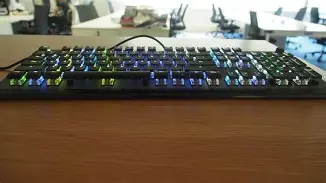
To understand the potential pitfalls of purchasing the Vulcan 120 Aimo, one must first understand what makes it different. Most mechanical keyboards utilize a high-profile "tub" design where the keys are recessed into a plastic or metal housing. Roccat took a different approach with the Vulcan series, opting for a low-profile anodized aluminum top plate and shortened keycaps that leave the switch housings entirely visible. This is not merely a stylistic choice; it changes the weight distribution, the way light is dispersed, and the maintenance requirements of the device.
At the heart of the Vulcan 120 Aimo are the Titan Switches. Developed by Roccat in conjunction with TTC, these switches were designed to address the "debounce" issues found in standard mechanical switches. By using high-quality components and reducing the signal processing time, Roccat aimed to create a switch that feels snappy and responsive. The Vulcan 120 typically features the Tactile Titan Switch, which offers a 1.8mm actuation point and a total travel distance of 3.6mm. This sits in a middle ground between a traditional mechanical switch and a "speed" switch, attempting to provide the best of both worlds for typing and gaming.
The Aimo lighting engine is another cornerstone of this device. Unlike standard RGB systems that rely on static patterns or user-defined zones, Aimo is designed to be "living." It reacts to user input and synchronizes across other ROCCAT peripherals. While this is a major selling point, it also represents a point of failure for users who do not wish to engage with specialized software or who use operating systems that are not fully supported by the Roccat Swarm suite.
Mistake #1: Ignoring the Proprietary Switch Feel
Perhaps the biggest mistake buyers make is assuming that the Titan Switch will feel identical to a Cherry MX Brown or Razer Orange switch simply because it is labeled as "tactile." While the tactile bump is there, the shortened keycaps and the specific housing of the Titan Switch produce a much sharper, more immediate bottom-out feeling. Users who are accustomed to the deep, cushioned travel of a traditional high-profile mechanical keyboard may find the Vulcan 120 Aimo to be "jittery" or overly sensitive at first.
The shorter travel distance (3.6mm vs the standard 4.0mm) can lead to increased typos for those who rest their fingers heavily on the keys. Furthermore, because the keycaps are ultra-light and thin to allow for better lighting, they do not have the same heft as PBT doubleshot caps found on other premium boards. Failing to account for this physical feedback difference is a primary cause of buyer's remorse.
Mistake #2: Underestimating Maintenance and Dust Exposure
The "naked" switch design of the Vulcan 120 Aimo is visually stunning, but it is a magnet for environmental debris. In a standard keyboard, the chassis acts as a shield, preventing dust, hair, and crumbs from reaching the delicate contact points of the switches easily. On the Vulcan, every switch is a pedestal. While this makes it exceptionally easy to use compressed air to blow away surface dust, it also means that the inner workings of the switch are more exposed to the elements.
Buyers often overlook the fact that the transparent housings, while beautiful when lit, show every speck of dust and every fingerprint on the aluminum plate. If you are not someone who is willing to perform weekly maintenance with a micro-fiber cloth and an air duster, the keyboard will quickly lose its premium luster. Neglecting the cleanliness of the Vulcan 120 Aimo isn't just an aesthetic issue; because the switches are so exposed, significant debris buildup can eventually interfere with the actuation of the keys.
Shop the latest Electronics picks on Amazon.
Shop Amazon →Mistake #3: Misunderstanding the Software Ecosystem
The Vulcan 120 Aimo relies heavily on Roccat Swarm software. This software is where you manage the Aimo lighting, rebind keys, and set up macros. A common mistake is purchasing this keyboard for use with a Mac or a Linux machine without realizing that Swarm is primarily a Windows-based application. While the keyboard will function as a standard plug-and-play HID device on other platforms, you lose the ability to customize the Aimo lighting engine, which is one of the primary reasons for the 120 model's premium price point.
Even for Windows users, the Swarm software has been a point of contention. It is a robust but heavy application that requires regular updates. Buyers who prefer "set and forget" hardware might find the notification-heavy nature of the software annoying. Furthermore, the Aimo lighting synchronization only truly shines if you are within the Roccat ecosystem (using a Roccat mouse and pad). If you have a mixed-brand setup, the "intelligent" lighting will not synchronize with your Razer or Logitech devices, leading to a mismatched visual experience.
Pros and Cons of the Vulcan 120 Aimo
- Pro: Exceptional Build Quality. The anodized aluminum top plate provides incredible structural rigidity, ensuring there is zero deck flex even during intense gaming sessions.
- Pro: Unique Aesthetic. No other keyboard on the market captures the "industrial-chic" look quite like the Vulcan, thanks to its thin caps and exposed switches.
- Pro: Dedicated Media Controls. The tactile volume knob and rubberized media buttons are some of the best in the industry, offering satisfying physical feedback.
- Pro: Aimo Lighting Engine. When fully operational, the reactive lighting is subtle and sophisticated, moving away from the "neon rainbow" cliché of most gaming gear.
- Con: Keycap Durability. The keycaps are made of ABS plastic rather than PBT. Over time, they are susceptible to "shine" (wearing down of the texture) from finger oils.
- Con: Ergonomic Limitations. The included palm rest is hard plastic and attaches via magnets. While functional, it lacks the plush cushioning found on competitors in this price bracket.
- Con: Non-Standard Keycaps. Because of the unique stem and cap shape, finding third-party replacement keycaps is extremely difficult, limiting customization options.
Comparison: Vulcan 120 vs. 121 vs. 122
Another common mistake is choosing the 120 model simply because it is the baseline flagship, without realizing that the 121 and 122 offer different switch and color configurations. The table below clarifies the primary differences to help buyers avoid selecting the wrong version of this specific chassis.
| Feature | Vulcan 120 Aimo | Vulcan 121 Aimo | Vulcan 122 Aimo |
|---|---|---|---|
| Color Scheme | Black / Titanium Anodized | Black Anodized | White / Silver Anodized |
| Switch Type | Titan Tactile (Brown-like) | Titan Linear (Red-like) | Titan Tactile or Linear |
| Actuation Point | 1.8mm | 1.4mm | 1.8mm / 1.4mm |
| Best For | Typing & General Gaming | High-speed Competitive Gaming | Bright/Clean Desk Aesthetics |
Mistake #4: Overlooking the Palm Rest Ergonomics
Many buyers assume that because the 120 Aimo comes with a palm rest, their ergonomic needs are fully met. However, the Vulcan 120 palm rest is a polarizing accessory. Unlike the padded, faux-leather rests provided by some competitors, the Roccat version is a slab of rigid, textured plastic. Its purpose is more about aligning the wrists with the low-profile height of the board rather than providing "comfort."
If you suffer from wrist strain or are used to a soft rest, you may find the included accessory inadequate. A significant buying mistake is not budgeting for a third-party foam or gel rest if you know you prefer a softer surface. Additionally, the magnetic attachment is relatively weak; if you move your keyboard frequently or play on an uneven surface, the rest can detatch easily, which can be frustrating during gameplay.
Mistake #5: Buying for the Wrong Environment
The Vulcan 120 Aimo is a loud keyboard. Even though the Titan Tactile switches are not "clicky" in the way a Cherry MX Blue is, the thin ABS keycaps and the aluminum backplate create a resonant "clack" when bottoming out. Buyers often underestimate how this sound carries in an office environment or a shared living space.
If your goal is a stealthy typing experience for late-night sessions while a roommate or partner sleeps nearby, the Vulcan 120 is likely the wrong choice. There are no factory-installed O-rings, and adding them is difficult due to the unique keycap stems. Avoiding this mistake means acknowledging that this keyboard is designed to be a centerpiece—both visually and aurally.
Buying Guide: How to Determine if the Vulcan 120 Aimo is Right for You
To avoid the mistakes mentioned above, follow this logical progression before committing to the purchase. Ask yourself these specific questions regarding your usage habits and preferences:
Assess Your Typing Style
Are you a "bottom-out" typer who hits the keys with significant force? If so, the low-profile nature of the Vulcan might feel harsh on your fingertips over long sessions. If you are a light-touch typer who enjoys a crisp, fast return, the Titan Switches will likely be a revelation. The 1.8mm actuation is fast enough for gaming but provides enough resistance to prevent accidental keypresses during data entry.
Discover deals on Electronics — updated daily.
Browse Now →Evaluate Your Setup Aesthetic
The Vulcan 120 Aimo is a statement piece. It looks best on a clean, modern desk. It features a braided cable that is high quality but relatively stiff. If you have a cluttered desk, the exposed design of the keyboard will only highlight the surrounding mess as dust accumulates on the bright aluminum plate. Furthermore, consider your other peripherals. If you already own several Roccat products, the Aimo integration makes sense. If you are deeply invested in another brand's ecosystem, you are paying for a software feature (Aimo) that you might not fully utilize.
Check Support for Essential Functions
While the volume knob is a standout feature, ensure you actually use physical media controls. If you rarely adjust volume or use software-based controls on a secondary screen, you might be better served by the Vulcan TKL (Tenkeyless) which removes the numpad and the dial for a more compact footprint. Buying a full-sized 120 Aimo when you need desk space for a large mousepad is a common logistical error.
Long-term Value and Durability Concerns
When spending a premium amount on a keyboard, you expect it to last five or more years. The Vulcan 120 Aimo has a storied history regarding its durability. The aluminum top plate is essentially indestructible, but the long-term viability of the switches depends on their environment. Because the Titan switch uses a modified housing to reduce signal debounce, it is technically more complex than a standard Cherry switch. While Roccat claims a 50-million keystroke lifecycle, real-world durability often hinges on how well the user protects the board from spills and heavy dust.
The ABS keycaps are another factor in long-term value. Within six months of heavy use, the most frequently used keys (WASD and the Spacebar) will likely develop a glossy sheen. This doesn't affect performance, but it does degrade the premium look of the device. Buyers who are sensitive to this should be aware that the Vulcan series is not "standard" for keycap swapping, so you cannot easily refresh the board with a set of PBT caps later on.
How to Avoid the "New Model" Trap
A final mistake buyers often make is ignoring the release cycle. Roccat (now under the Turtle Beach brand) frequently updates its lineup. Before buying a 120 Aimo, check to see if the Vulcan II or Pro versions are available. These newer models often address specific complaints from the original series, such as adding optical switches or improving the lighting zones. However, the 120 Aimo often remains on the market at a significantly lower price point than the newer versions, making it an excellent value proposition as long as you are aware of its specific quirks.
Conclusion
The Roccat Vulcan 120 Aimo remains one of the most visually impressive and structurally sound mechanical keyboards available. It is a masterpiece of industrial design that offers a distinct typing experience through its bespoke Titan Switches and exposed architecture. However, the path to a satisfying purchase is paved with technical details that many buyers overlook. From the specific ergonomic feel of the rigid palm rest to the maintenance requirements of the "naked" switch design, the Vulcan 120 demands a specific type of owner.
By avoiding the common mistakes of ignoring software compatibility, underestimating the volume of the typing sound, and failing to account for ABS keycap wear, consumers can ensure their investment is well-placed. If you value a fast, tactile response and a lighting system that truly feels "alive," and you are willing to maintain the board's pristine aluminum surface, the Vulcan 120 Aimo is a formidable tool. It is not just a peripheral; it is a specialized piece of hardware that, when matched with the right user, enhances both productivity and play.